
The files behind the scenes
Most RCM products that deal with claims or payments tackle 837s (the claim a provider sends) and 835s (the payer’s remittance). Even though they are not human friendly, they follow the X12 standard and parsing them is a solved problem But they don’t tell the whole story. To link claims to patients, and payments to the right claims, we needed the flat files our clients sent along with them: account files and transaction files. These files had no standard. Each client’s system exported them differently, with its own columns and layout. Before we could use them, we had to bring them into one common format and store what mattered in our system.Why we didn’t write code
Most of the work was column mapping: this column in the client’s file goes into that field in our database. A custom parser for every client would have meant more code to build, test and maintain each time we added one. So we used Azure Data Factory (ADF). It handles data movement, transformation, scheduling and event-driven processing out of the box. That covered everything we needed.How it works
We built one base pipeline and adapt it to each client’s file formats and rules. It runs in the client’s own Azure account. Clients drop their files on an FTP server. At a set time, when the files should be there, the pipeline runs. It reads the files, maps the client’s columns to our database tables and loads the data. Reconciling it with the 835 and 837 data happens after that, in our system.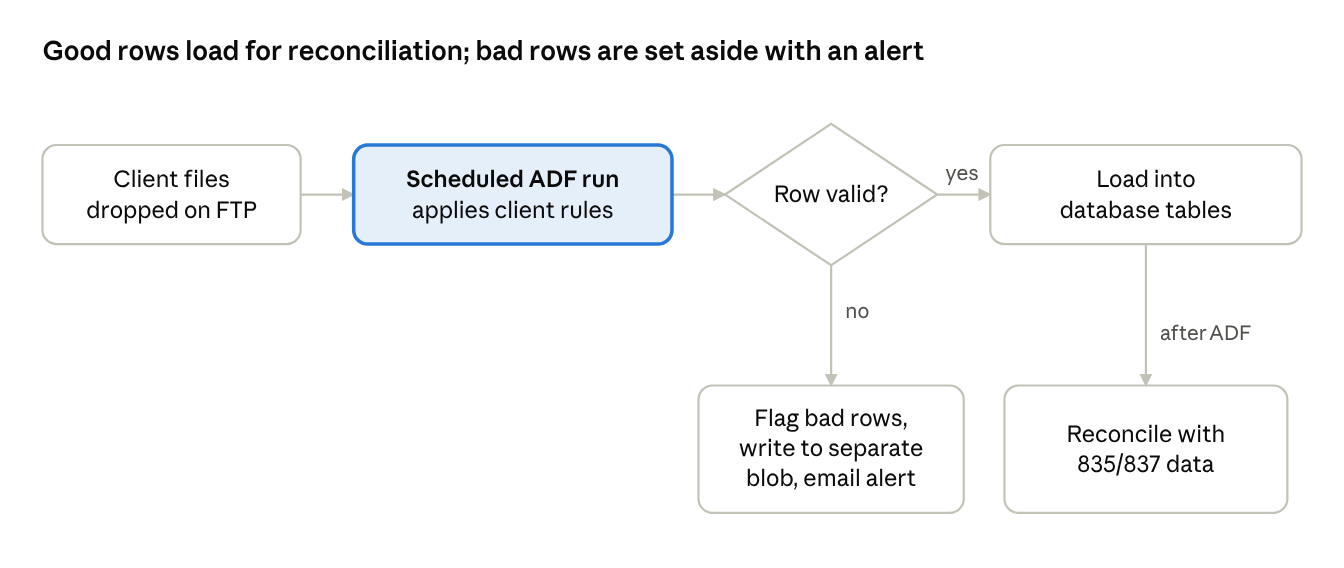 flat file pipeline · one check, two paths
Every row is checked. Good rows go to the database for reconciliation; bad rows are set aside and someone is told.
When the data is bad
Client files are rarely clean. The pipeline flags rows with bad data, writes them to a separate blob storage location and sends an email notification. All of this happens inside the pipeline. Nobody has to open files and check them by hand, and bad rows never mix with the good ones.Optimized Onboarding time
With the base pipeline in place, onboarding a new client takes less time. The first run takes a few hours, mostly to see what fails. Tweaking the pipeline for that client’s files takes about another day. Those first runs also show up gaps in the client’s own data. Where something could not be reconciled, such as data that was simply missing, we told the client. Finding those gaps early is useful to them in its own right. Not every data problem needs code. When the work is mostly mapping, a configurable pipeline gets a new client running quickly and keeps our engineers on the work that does need code.Cennest works deep inside revenue cycle data: 835s and 837s, the account and transaction files that come with them, and the reconciliation that ties it all together. We help RCM vendors build data pipelines that adapt to each client’s files instead of breaking on them. If onboarding new client data is slowing you down, let’s talk
Team Cennest